Thursday, June 24, 2010

Friday, July 24, 2009

How to lock MacBook with keystroke combination?

I used to lock my Windows XP laptop easily with Win+L key combination. When I switched to MacBook I searched for a inbuilt option like that. It wasn't there.


After some searching I found LockTight. Now I use the key combination Shift + Option + Command + L to lock the screen when moving away from the Laptop. Now easier but atleast now I have a way to lock the Macbook.

with regards
Tushar

Switch to Apple MacBook Pro 17"

Recently I shifted to Apple MacBook Pro 17" and I am pleased with the performance. Now I use Sun VirtualBox to work in my work environment where Microsoft Windows XP is installed. I also have one virual machine with Ubuntu 9.o4 and Open Solaris.

I got Marathi language typing features by the Devnagari QUERTY keyboard option out of the box in Mac OS X which is a productive move for me.

Tushar Joshi, Nagpur

Thursday, July 23, 2009

Skype 2.8 for Mac OS X now shows who is typing


I was missing the who is typing notifications in my Skype on Mac OS X which is now available as claimed by the new version of Skype 2.8 on Mac OS X.

When I checked where this notification is shown it is visible in the drawer where the participant's names and icons are shown. This means if you want to see who is typing you have to keep the drawer open which chatting in a conference window.

with regards
Tushar Joshi, Nagpur

Monday, November 03, 2008

Dropbox lets you share files across Windows, Mac and Linux

Dropbox is a desktop software which allows you to share files across multiple computers irrespective of whether it is a Windows box, Mac box or Linux box.

Dropbox creates a special folder in your computer and you just have to keep your files in this folder to share them.  On each computer you will get one Dropbox shared folder synchronized.  This means you put a file in this folder in Windows box, and when you switch to Mac box you get the same file exactly with same contents there.

There is also a web interface to view your shared files and the video introduction and tour are too good to watch and understand.  

Download your copy of Dropbox now!

with regards

Friday, October 10, 2008

Way to post Twitter updates through IM

As suggested on the get satisfaction site I tried Ping.fm for updating my Twitter and Facebook messages.  This is quick and easy way to update Twitter.

Since many months the IM feature of Twitter is down.  I used to rely heavily on that feature.  Even if some features like direct messaging and receiving tracked updates are not available with Ping.fm it alteast provide a facility to post updates through IM.

with regards

Saturday, September 20, 2008

Make Windows XP look like Windows Vista

I installed the Vista Inspirat software and my Windows XP system is now looking like Windows Vista.


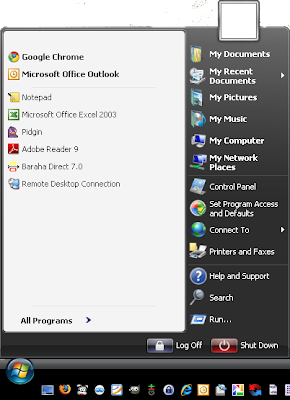
This is a screenshot of my start menu after the Vista Inspirat software is installed.  There are many interesting features worth trying.  You can visit the Vista Inspirat site to download the software and see your Windows XP system look like Windows Vista.

with regards
Tushar

Wednesday, September 03, 2008

Google Crome Browser


I downloaded my copy of the Google Crome Browser.  I am happy to see the interface as expected, Simple!

Lots of functionalities are yet to be tested and it will take many days for me to understand the browser.  It gives GMail its own window and it is very useful.


with regards
Tushar

Sunday, August 17, 2008

GMail - Sign out all other sessions

Now GMail account is more secure. GMail provides information about how many sessions of the GMail account are currently open.

So if you have logged in to the GMail account from Cyber Cafe or a friends house and you do not remember whether you have properly logged out or not? Or if you have logged in to the account from home and the laptop is still on and used at home and you want to make sure you are logged off from the account.

GMail page now shows the opened sessions information at the bottom of the page. We can click the details link provided with that information to read the report of all the sessions and last activities done with our account.


This report is helpful in determining whether the account is opened from two places. The IP address information also provides insight whether the account is compromised.

The most important feature now GMail provides is the Sign out of all other sessions button on this report. Now we can just sign out of all other GMail sessions we may have opened from any other place by clicking this button. Only the session we are currently using is kept on and all others are logged off.

Now that is really secured.

Reference:
Official GMail blog post

With Regards
Tushar Joshi, Nagpur

Tudumo - my task list

Tudumo is a clean and elegant way to manage your tasks. The tag line is so real. Tudumo is simple and quick solution to my task list job.

I purchased Tudumo in April 2008 and I feel I took a good decision as I still continue to use this software. The creator of Tudumo is very efficient and active in answering queries on the support mailing list.

There are many new features to be added in Tudumo in coming days but my point is I am happy with Tudumo as it is now. Thanks Richard for this great piece of software and making my life more organized.

With Regards
Tushar

Tuesday, August 12, 2008

Temporary Mail Address for 10 Minutes

10 Minutes Mail is service which provides you a temporary email address for 10 minutes. Why would someone need such a temporary email address and that too for 10 minutes only?


The author of the service explains this fact tactfully on the home page of the service.

We can use this temporary address to sign up with some new web site and later can change our email to the actual one once we are satisfied with the site.

with regards
Tushar Joshi, Nagpur

Monday, April 28, 2008

How Does the NetBeans IDE compare Four Years Later?

netbeans.org site's recent news feed today contains a link to my blog NetBeans IDE 6.1. They have changed the title and made it more clickable ;)


The same link is also available on the main page of the site as a dynamic ticker item. I am happy :)

with regards
Tushar

Sunday, April 27, 2008

Tuesday, April 08, 2008

Missing NetBeans tag for link submission in DZone links section

Many a times when I submit a link related to NetBeans on DZone Links section through the Submit New Link page, I am offered with a list of tags. According to the conversion I am required to choose minimum 4 tags for my link submission.

I wonder when there is a NetBeans zone available why a NetBeans tag is not available for the links. There is an eclipse tag but no generic tag like "IDE" for IDE related links.

I end up using general tags like java, tools etc for my NetBeans related links.

with regards
Tushar Joshi, Nagpur

Friday, April 04, 2008

GTD for Sequence Diagrams - Powerful tool

Steve Hanov has created an online service Web Sequence Diagrams. This service lets you draw sequence diagram through a sequence of English statements in a particular way which is called as SD/MSC on the site.

The power of this technique lies in its simplicity. The sequence diagrams can now be stored as plain text files and can be rendered any time through the online service.

The sample SD/MSC on in the above screen shot gets rendered as below.
I see potential in the technique as the plain text sequence file can take part in version control systems easily due to the plain text nature.


We can copy paste and alter sequence diagrams easily. We don't have to think about where to click, how to attach the graphics lines and the online rendering service takes care of drawing a nice sequence diagrams for you.

The service also provides different styles for the sequence diagrams like Rose style, Plain style. When I saw this service through Architects Zone in DZone, I jumped on my seat with pleasant surprise. This was a treasure found for me. Thanks Rob for this wonderful tip.

The tool I used for sequence diagrams till now is ArgoUML. ArgoUML is very good at class diagrams but somehow its sequence diagrams portion is very dull and unintuitive. It also screws up large sequence diagrams. This service has provided a wonderful alternative and saved many hours from my word day.

This tool is a super duper hit in my development team. All find this tool easy to create sequence diagrams and even the developers who were not much interested in creating sequence diagrams due to the time it took in ArgoUML have started creating sequence diagrams.

Sequence diagram is a important part of the design of software before we start coding it. It lets us think on paper, in terms of concepts classes and interfaces and the messages we need to pass between objects. It helps us identify possible new classes required in a new user case development.

The online service Web Sequence Diagrams made this task piece of cake.

with regards
Tushar Joshi, Nagpur

Sunday, March 30, 2008

Call Graph makes Skype call recording piece of cake

Call Graph is a free call recorder for Skype. It is a simple application to automatically record your calls in an mp3 file.

Features

* Call Recording: record your calls in an mp3 file, automatically.
* Full Skype Support: record Skype to Skype, SkypeIn, SkypeOut calls.
* Completely Free: no limits or restrictions of any kind.
* Manage Records: use tags to mark your records.
* Integrated Search: use tags to search through your calls records.
* Simple and Un-intrusive: minimal interface, easy to use, un-annoying.


After the pidgin plugin by Skype this is one more important feature becoming available to make call recording easy.

Tushar Joshi, Nagpur

Monday, March 24, 2008

Taking screenshots with GIMP

I am fond of the GIMP software.

GIMP is the GNU Image Manipulation Program. It is a freely distributed piece of software for such tasks as photo retouching, image composition and image authoring. It works on many operating systems, in many languages. (more...)


There is a windows distribution of the GIMP. It makes the task of taking screenshots and saving them with some touching easier for me.

The options are either Paste as new, which created a new image document from the contents of the clipboard. So when I use ALT + ProntScreen option to take a screenshot of the current window, GIMP provides a handy way of creating a new file from the contents of clipboard.


The second option is Grab window or desktop which can be used directly to create a new image of the desktop or any window.

I need lots of screenshots for my Netbeans blog now a days and GIMP helps me doing that.

with regards
Tushar

Saturday, March 22, 2008

Harshad Oak - First Java Champion in India

Harshad Oak is the first “Java Champion” in India. Harshad is involved with Rightrix Solutions , Rightrix Research, IndicThreads.com and the IndicThreads.com Conference On Java Technology.

Here’s some info about “Java Champions”.

Founded in 2005, the Java Champions project is a community of influential thought-leaders who have a passion for Java technology. The concept behind the Java Champions program is to build a somewhat informal but select grouping of Java technology leaders from different areas of the community including professional developers/architects, academics, authors, consultants, and other influencers. Sun wants to engage with these community leaders to give them the opportunity to provide feedback on technology ideas and directions for Sun…

More info about Java Champions can be found at - https://java-champions.dev.java.net/

Harshad I am proud of you as the first Indian selected as Java Champion.

with regards
Tushar Joshi, Nagpur

Friday, March 21, 2008

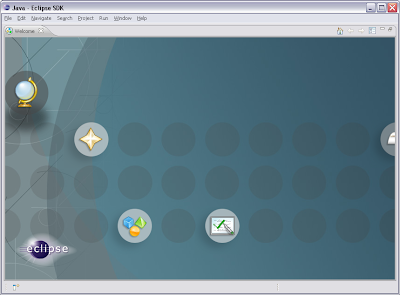
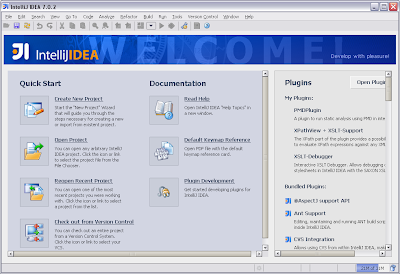
What IDE do you use Eclipse IntelliJ IDEA or Netbeans?

I started self learning Java with Notepad. Soon I discovered the Kawa editor which provided some compilation support and I was happy. In those days Kawa was seen as a great help as it provided some IDE like features. This Kawa editor was very small program that time and now is in the Kawa 5.0 incarnation.

The world of programming changed for me with the introduction of Eclipse IDE in my programming life. Eclipse was the first full fledged IDE where I started real Java programming. Being the first to land on my desktop Eclipse still enjoys the position of my favorite IDE.

I soon learned how to download different Eclipse plug-ins. The Eclipse plug-in world is abundant with plug-ins to suit each and every need.


When there came the time where I was required to recommend and IDE, obviously my choice was Eclipse. I had also conducted some trainings for Eclipse and I was very comfortable with Eclipse and actually that was the only IDE I was knowing for many days. So the choice of Eclipse was straight forward. It also provided the Open Source goodness and this made my recommendation powerful.


Project started this way with Eclipse IDE is still going on. Once you start a big project with some IDE then you need to stick to the same IDE what may come. There are release after releases to deliver and big code base to maintain. All our sandboxes are made Eclipse oriented.

So here I am happy with Eclipse. But this does not make me Eclipse fanatic. I like to explore different IDE solutions also. When I started conducting JPDC Java course I though I shall demonstrate all the professional IDEs to my students and hence got more interested in other IDEs like IntelliJ IDEA.

When I read about IntelliJ IDEA I read all the praises by the users of this IDE. There is ample evidence of people writing good things about IntelliJ IDEA to believe it is a good IDE with lots of features and support from Jetbrains company.


When I use IntelliJ IDEA I can find many features which I got acquainted with in Eclipse are present in IntelliJ IDEA. There are some common features in IDE world now a days which are supported by all the professional IDEs. In fact it becomes necessary for them to support those features to remain in the picture.

Then there are differences in the way of working in Eclipse and IntelliJ IDEA. Obviously one who is very comfortable with Eclipse has some hard time getting acquainted with any new IDE. I have kept my brain open for any good tool which makes me productive and IntelliJ got added to my tool box after I used many features of this IDE.


Recently I have started exploring the features of Netbeans IDE, an IDE supported by Sun Microsystems. I have read many news articles and blog posts in favor of Netbeans. Netbeans also looks like a good IDE.

Netbeans also have some interesting features out of the box like Matisse GUI editor which is not directly available in Eclipse. GUI editing is available in IntelliJ IDEA.


So there are three main IDEs in my Java Programming tool box. I really do not want to favor any one of them just because of certain good features. I believe all the IDEs are evolving and ultimately will reach same feature levels which become common and indispensable in the programming world. Due to work constraints I have to use Eclipse at work as it was a conscious decision that time.

I am exploring Netbeans and IntelliJ IDEA passionately and this may also change my recommendations about IDE choice in the coming days.

Lastly if we make an analogy of programming with driving, we have some common tasks that need to be done for driving and the Car really doesn't matter in that sense. All Cars are used to reach to some destination. Just having a Car and bragging about the cool features of the Car wont make you reach the destination. You must drive the Car and which is a pretty common exercise in all the Car models. Surely different Cars will provide you different comfort levels and you are free to maintain a choice and also brag about your choice.
At the end of the day all IDEs remain tools for achieving task of completing the programming task assigned to you. They remain tools required to reach the destination and the destination is above the tool we use.

I will keep my exploration in the IDE world going on. Let us see what future has for us in this region, we may see many more IDEs and many more features in these IDEs.

Tushar Joshi, Nagpur

Monday, March 17, 2008

When TaskManager refuses to work

Suddenly the Google search page I launched re-opened in another tab. After some time it again opened one more tab. This was never expected. I thought this might be one of the many Firefox extensions I have installed due to my over enthusiasm but it opened one more time. I was annoyed. I closed all the Google search tabs. I opened a fresh Google Search Tab from the Google Toolbar, it opened a tab with Google Home page and again came the next tab with same home page and again and again. What is this... I was too annoyed.

I was so confused who to blame. Is the the Google Toolbar? Is it any one of my many Firefox add-ons? Is it Firefox? This was not happening on any other page but Google Search Page.

I grabbed IRC channel #firefox on irc.mozilla.org and poured all my annoyance on the room. Somebody told me to create a new profile.

firefox.exe -P

Wow I never knew that shortcut to open the profile manager in Firefox. This trick didn't worked at all and then suddenly there was a dialog box in Firefox with text "ntdetect1.exe" with some more words. There were totally new words for me. I got a new word to search but the annoying Google Search page kept playing multiply game with me so much that I shifted to Yahoo Search. Sorry Google! buddy I could not help but to search for the word ntdetect1.exe in Yahoo search. What can I do your page was so screwed up for me.

No good answer on search pages for ntdetect1.exe and they only told me that this is some sort of virus and shall be removed by deleting its directory. But what has happened to my Firefox and the Google Search page?

I un-installed Firefox, re-downloaded 2.0.0.12 version for Windows. I installed it again. I deleted all my add-ons, I tried safe mode but in all the cases the Google Page kept multiplying itself.

Now I got suspicious. Is there really a virus named ntdetect1.exe in my machine. I tried to start the TaskManager but as soon as I started the TaskManager it showed up for a second and vanishes. This happened so many times that I quited opening the TaskManager. I thought some thing may have gone wrong with the memory and I re-booted the machine. This time again the TaskManager did the same thing.. I started and then suddenly in moments time vanished from the screen.


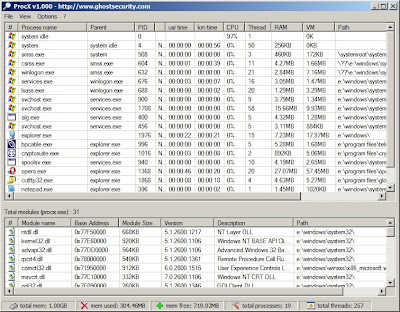
Then came my feed reader GreatNews to rescue me with his tip. The DownloadSquad team just blogged about a cool product ProcX. As ProcX site says, ProcX displays all running processes and modules on your systems. It is a necessity to monitor running processes on your system to determine if anything malicious may be running. ProcX allows you to perform various functions on these running processes and DLLs. ProcX is especially useful for system administrators who disinfect computers.


I downloaded ProcX hastily and started the program and there stood the ntdetect1.exe executable running in my memory. It must have some control over the TaskManager and may be doing some trick to close it as soon as it opens. I terminated the ntdetect1.exe process. I also got the real path of this executable through ProcX and I deleted its directory also. Then I opened command prompt and started regedit to delete the Run key this program might have set in the system startup and yes it was there, for me to delete.

At last my machine is now ntdetect1.exe free. My Firefox is opening Google Search page only when asked and only once per request. It has stopped multiplying and annoying me. My all the old good add-ons are again back in my Firefox. Situation is under control now.

Thanks to all my friends who rescued me from this annoyance. Thanks to the friend at IRC #firefox, thanks to DownloadSquad, thanks to ProcX, and thanks to you all who read till here about my journey for saving my browser from the dirty hands of ntdetect1.exe virus.

with regards
Tushar Joshi, Nagpur